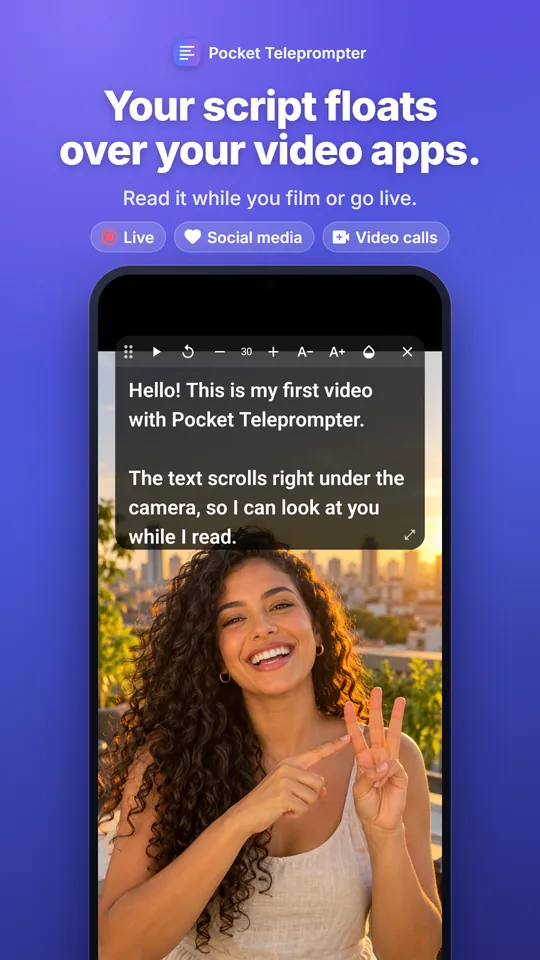
- The text floats over TikTok, Instagram, CapCut or a video call.
- The app’s camera films your face, not the screen: the text is not in the video.
- Place the window at the top, close to the lens, and keep it narrow.
- Android asks once for the “Display over other apps” permission.
Why film directly in the app
Social apps have their own strengths: trending sounds, filters, effects, quick editing and sometimes live. Filming elsewhere and importing takes time and loses those tools. The catch: their cameras show no text. A floating teleprompter fills the gap by keeping your script visible on top of their screen.
Does the text show up in the video?
No, not with the TikTok, Instagram or CapCut camera: they record what the lens sees, which is you. The floating window stays on your screen, for you only. One exception: if you use the phone’s screen recorder, everything on screen is recorded, text included.
Set up the floating teleprompter
- Prepare your script
Write or paste your script in Pocket Teleprompter. Short sentences and one idea per line read best in a small window.
- Start the floating prompter
Tap “Floating prompter” at the bottom of your script’s editor (or from your list of scripts). The first time, Android asks you to allow display over other apps: turn it on, then come back.
- Open TikTok, Instagram or CapCut
Your text is already floating. Open the app’s camera and switch to the front camera.
- Place and adjust the window
Drag it to the very top, right under the lens. Resize it, adjust text size and speed, then tap play and start recording.
The window controls
- The handle: drag it to move the window to the very top, near the lens.
- Play and pause: start the scrolling when you start filming.
- Reset script: go back to the start for a new take.
- Slower and Faster: the speed shows between the two buttons.
- Smaller text and Larger text.
- Opacity: makes the window background more or less see-through.
- Resize: changes the width and height of the window.
- More controls: when the window is narrow, the other buttons are kept here.
- ✕ (Stop): closes the floating prompter.
The right settings for a small window
- A narrow window at the top keeps your eyes near the lens.
- Slightly bigger text than usual, because the window is small.
- A slightly slower speed than in the full-screen prompter.
- Leave an empty line at the start to give yourself time to hit record.
- Tap Opacity to make the window more see-through and check your framing underneath.
- The text scrolls at the speed you choose: voice follow does not work in the floating window, because the other app is already using the microphone.
Record a 10-second test and watch it: if your eyes visibly drop, move the window up or make it narrower.
For live streams and video calls
The floating prompter also works during a live stream or a video call: your key points stay in sight without switching apps. For a live, prefer a list of short points to a full script so you stay natural.
Stopping the floating prompter
Tap the ✕ button in the window to close the floating prompter. Another way: a notification stays on while the text floats; tap Stop in that notification. On Android 13 and later, allow the app’s notifications to see that notification.
FAQ
Can I use a teleprompter with TikTok?
Yes. A floating teleprompter shows your text over the TikTok app while you film with its camera. The text does not appear in the video.
Does the teleprompter text show up in an Instagram video?
No, Instagram’s camera films your face, not the screen. The text would only appear if you used the phone’s screen recorder.
Why does Android ask for a permission?
Showing a window over other apps requires the “Display over other apps” permission. It is asked once and can be removed in Android settings.
Can the floating prompter follow my voice?
No. While you film in TikTok, Instagram or CapCut, that app uses the microphone, so the text scrolls at the speed you set in the window. Voice follow works when you film in Pocket Teleprompter.
Is the floating prompter free?
Pocket Teleprompter includes two free tries every month. With Premium it is unlimited.