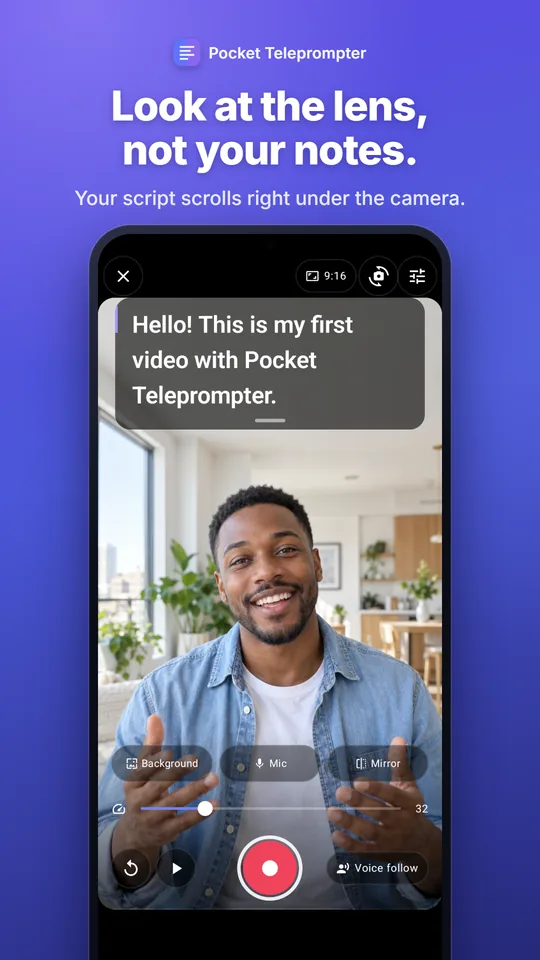
- Six apps compared on the same points, from their Google Play listings of 18 November 2026.
- Free with ads: Pocket Teleprompter and Elegant Teleprompter. Free up to 750 characters per script: Teleprompter for Video.
- Floating prompter, voice follow, backgrounds, captions: no app does everything for free.
- On iPhone, with nothing to install: the Pocket Teleprompter online studio.
Where this information comes from. This guide is written by the Pocket Teleprompter team, so we are both judge and party. To stay fair, we only report what each publisher writes on its own Google Play listing, read on 18 November 2026. When a listing says nothing about a point, we write “not stated”: that does not mean the feature is missing. Apps change: check their listing before you install.
What to look at before you choose
- What is really free. Almost every app installs for free. The difference is in the limits: script length, ads, features kept for subscribers.
- The script near the lens. If the app records the video itself, the script should scroll right beside the camera: that is what keeps your eyes on your audience.
- The floating prompter. It shows the script on top of another app: the TikTok or Instagram camera, a video call, a live stream.
- Voice follow. The script moves when you talk and waits when you stop. No more setting the speed.
- The background. Some apps blur or replace what is behind you: sometimes while recording, sometimes afterwards, sometimes only with a real green screen.
- Your phone. Not all of them exist on both iPhone and Android.
The comparison table
| Pocket Teleprompter | Teleprompter for Video | Teleprompter: Vlog & Scripts | BIGVU | Teleprompter. | Elegant Teleprompter | |
|---|---|---|---|---|---|---|
| Publisher | NogLabs | Teleprompter for Video Ltd | Solid Labs | BIGVU | Teleprompter LLC | Ayman Elakwah |
| Free version | Yes, with ads | Yes, for scripts up to 750 characters (about 1 minute) | Yes, limits not stated | Yes, limits not stated | Yes, limits not stated | Yes, with ads |
| Paid version | Optional Premium | Premium | In-app purchases | In-app purchases | Pro subscription, 3-day trial | Separate Pro version |
| Where it runs | Android; iPhone and computer through the online studio | Android, iPhone | Android, iPhone | Android, iPhone, iPad, web | Android, iPhone, Mac, web | Android |
| Records with the script near the lens | Yes | Yes | Yes, in Full HD | Yes | Yes | Not stated |
| Floating prompter | Yes: 2 free tries a month, unlimited with Premium | Yes, with Premium | Yes | Not stated | Not stated | Yes |
| Voice follow | Yes: 2 free tries a month, unlimited with Premium | Not stated | Yes, without an Internet connection | Pause during silences | Not stated | Not stated |
| Background | 10 virtual backgrounds with no green screen, 3 of them free, while recording | Background change after recording | Not stated | Background blur; green screen replacement | Not stated | Not stated |
| Automatic captions | No | Yes | Not stated | Yes, with translation | Not stated | Not stated |
The six apps, one by one
Pocket Teleprompter (NogLabs). The app records in Full HD with the script just below the lens, in vertical, square or landscape. It needs no account and adds no watermark. The free version takes scripts up to 5,000 characters and offers 3 free backgrounds: blur and two scenes. Voice follow, the floating prompter and the AI writing assistant can each be tried twice a month; they are unlimited with Premium, except the assistant, which then gives 100 credits a month. The interface comes in 5 languages, including Arabic.
Its limits: the free version shows ads. There is no iPhone app yet: on iPhone you use the free online studio, which has neither voice follow nor the floating prompter. The app does not make automatic captions and does not sync scripts between devices. It is also the newest of the six.
Teleprompter for Video (Teleprompter for Video Ltd). It records with the script beside the lens, in portrait or landscape, with the front and rear cameras. After recording, it can add automatic captions and text, and change the video background. It works with a Bluetooth remote, a keyboard or a foot pedal, and imports scripts from Dropbox, Google Drive, OneDrive or iCloud.
Its limits, according to its listing: it is free for scripts up to 750 characters, about one minute of video. Longer scripts, the floating prompter, the logo, music and AI rewriting need the Premium subscription.
Teleprompter: Vlog & Scripts (Solid Labs). It records in Full HD, in portrait or landscape, and offers a floating prompter that works with any camera app. Its scrolling can start and stop with your voice, with speech recognition that runs on the phone, offline. It imports PDF, TXT and Word files, handles right-to-left scripts and backs scripts up online once you sign in to an account.
Its limits: the listing mentions in-app purchases without saying what stays free. It mentions neither backgrounds nor captions.
BIGVU. It is the most complete for what comes after recording: automatic captions with translation into more than 70 languages, editing, reframing, publishing to social networks, an AI script writer. While recording, it blurs the background and offers a pause on silence. It exists on Android, iPhone, iPad and the web, with a synced account.
Its limits: the listing mentions in-app purchases without detailing what stays free. Background replacement is described for a real green screen.
Teleprompter.com (Teleprompter LLC). It lets you write and edit scripts, import Txt, Word and PDF files, record inside the app and read offline. It works with a Bluetooth keyboard or a Wear OS watch. It also exists on iPhone, Mac and the web.
Its limits: advanced features go through a monthly Pro subscription, after a 3-day trial. The listing mentions no floating prompter, no voice follow and no backgrounds.
Elegant Teleprompter (Ayman Elakwah). It shows the script in a floating window that you move and resize, to use together with your camera app or during a live on Facebook or Instagram. It sets the speed, size, line spacing and width of the text, has a mirror mode and accepts a Bluetooth remote.
Its limits: the free version shows ads and imports .txt files only; the Pro version, sold separately, removes ads and reads .docx files. The listing does not say that the app records video itself.
Which one should you choose?
- To start for free: Pocket Teleprompter records scripts up to 5,000 characters with no account; Elegant Teleprompter suits you if you prefer filming with your usual camera app.
- To read on top of TikTok, Instagram or a live stream: Elegant Teleprompter and Teleprompter: Vlog & Scripts list a floating prompter; Pocket Teleprompter gives it twice a month for free; Teleprompter for Video keeps it for Premium.
- To have the script follow your voice: Teleprompter: Vlog & Scripts and Pocket Teleprompter.
- To change your background with no green screen while recording: Pocket Teleprompter.
- For automatic captions and editing: BIGVU or Teleprompter for Video.
- To find your scripts on iPhone, Mac and computer: Teleprompter.com or BIGVU.
- On iPhone, with nothing to install: the Pocket Teleprompter online studio opens in Safari, free and with no sign-up.
Before you commit, write a two-minute script and film it with two or three of these apps. You will see at once which one lets you finish without paying.
FAQ
Is there a completely free teleprompter app?
Several have a usable free version: Pocket Teleprompter and Elegant Teleprompter are free with ads, and Teleprompter for Video is free for scripts up to 750 characters. Advanced features are almost always paid.
Which teleprompter app should I choose on iPhone?
Teleprompter for Video, Teleprompter: Vlog & Scripts, BIGVU and Teleprompter.com exist on iPhone. With nothing to install, the Pocket Teleprompter online studio works in Safari.
Which app shows the script on top of Instagram or TikTok?
On Android, Elegant Teleprompter, Teleprompter: Vlog & Scripts, Teleprompter for Video (with Premium) and Pocket Teleprompter (2 free tries a month) list a floating prompter.