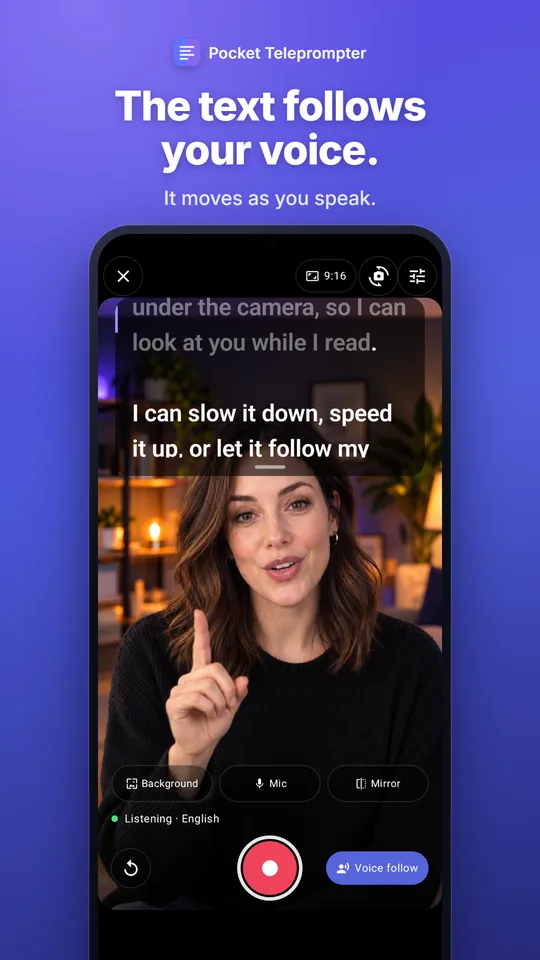
- Most camera nerves come from the fear of forgetting: a script near the lens removes it.
- Look at the lens, not at your face on the screen.
- Talk to one person you know, not to “an audience”.
- Record three short takes rather than one long perfect one.
Watch the tutorial
One minute to see it all in action.
Played by YouTube (Google): the video only loads when you tap it. Privacy
Why we freeze in front of a camera
In front of a lens, your brain juggles three jobs: remembering the words, watching your own image and imagining other people’s judgement. That overload is what causes the “ums”, the wandering eyes and the flat voice.
So the fix is not to magically “feel confident”. It is to remove those loads one by one. Once you no longer memorise, no longer stare at your face and speak to someone specific, only the essential is left: your message.
1. Stop memorising: keep the script beside the lens
Learning a script by heart is the number-one source of stress. One blank and everything collapses. A teleprompter shows your words just under the camera, so you read with your eyes almost on the lens and viewers feel you are looking at them.
The key is the distance between the line you read and the lens: the shorter it is, the less your eyes move. Use a narrow text column and a font big enough to read at arm’s length.
2. Look at the lens, not the screen
The natural reflex is to watch your own face. On video, that makes you look slightly down. Look into the small black dot of the camera instead. A simple trick: put a tiny arrow sticker next to it to remind your eyes where to go.
3. Talk to one person, not a crowd
Picture one person you like sitting behind the lens: a friend, a client, your brother. Your tone instantly becomes warmer and simpler. Write your script as if you were sending them a voice message.
Hey!
Today I want to show you
a little trick that saves me
two hours every week.
And it takes thirty seconds.
4. Warm up your voice and body (2 minutes)
- Breathe from your belly
Three slow breaths: in for four seconds, out for six. Your heart slows down and your voice drops.
- Wake up your mouth
Read one sentence aloud while over-articulating. Your words will come out crisper in the take.
- Smile before you start
A light smile at the start changes the energy of your first sentence, the one that keeps viewers watching.
5. Record three short takes
Do not chase the perfect take in one go. The first take finds the rhythm. The second fixes eye contact. The third adds intention and pauses. Split long videos into 30-to-60-second chunks: they are easier to record and make a livelier edit.
Bad take? Delete it straight away and go again. The fewer bad takes you keep, the less painful the sorting.
6. Use pauses as a tool
Beginners talk fast to “get it over with”. A one-second pause before an important idea grabs attention. Mark pauses in your script with a line break: your eyes will see them at the right moment.
7. Rehearse without recording
Do one full read in rehearsal mode, with zero pressure. You will spot the sentences that trip you up and simplify them before the real take. Two rehearsals are usually enough for a one-minute video.
What matters most: consistency
Comfort comes with volume. One short video a day for two weeks beats ten attempts at perfection. Keep your first videos: in a month, the difference will motivate you.
FAQ
How do I stop being nervous on camera?
Remove the sources of stress one by one: do not memorise (use a teleprompter), do not watch your face on the screen, talk to one specific person and record several short takes. Comfort comes with regular practice.
How can I read a script without it showing on video?
Place the text as close to the lens as possible, in a narrow column, and write short sentences meant to be spoken. Eye movement becomes almost invisible.
Should I memorise my script?
No. Memorising creates the fear of going blank. It is better to know your ideas and read a well-written script shown next to the camera.
Which teleprompter should I use on my phone?
Pocket Teleprompter for Android shows the script under the camera, can follow your voice and records the video directly. It is free to install.